

There’s no denying that RGB lighting has taken over the custom PC scene. From RAM sticks to power supply cables, if it exists, there’s probably a version of it with some form of customizable lighting. The glow of a well-lit setup can transform an ordinary build into something that feels personalized and premium. But here’s the thing: more lights don’t automatically mean better aesthetics. In fact, many PC builds fall into the trap of being so over-saturated with color and motion that the original appeal of RGB — customization and style — gets lost in a chaotic mess of clashing hues and dizzying effects.
Done right, RGB lighting can elevate a build, making it look sleek, modern, and uniquely yours. Done wrong, it turns a high-end rig into a carnival ride. The key isn’t just having RGB — it’s knowing how to control it, coordinate it, and, most importantly, when to stop. Building a PC that shines (literally and figuratively) means focusing on balance, intention, and restraint.
Start With a Vision, Not Just a Shopping List
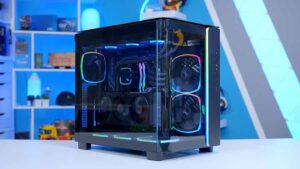
Before buying a single part, think about what you want the finished build to look and feel like. Are you going for a clean white-themed setup with cool blue lighting? A dark, moody black case with subtle purple accents? A cyberpunk-style explosion of neon? Or maybe a stealthy look where RGB plays a minimal but focused role? Having a clear aesthetic direction helps you make smarter choices when picking parts, especially when it comes to lighting.
Too often, people chase specs and then throw in a bunch of RGB components without thinking about how they’ll work together. The result can be mismatched lighting zones, different shades of “white,” and lights blinking on different rhythms. Instead, plan your color scheme, mood, and level of intensity from the start. This mindset shifts the process from random accessorizing to deliberate design.
Match Lighting With Hardware — Not Against It
There’s a big difference between adding RGB to a build and making RGB a part of the build’s design language. When lighting feels integrated — not just tacked on — it blends naturally with the case, cables, and components. The best builds feel like a unified piece of tech art, not a Frankenstein collection of glowing parts.
That means paying attention to how your hardware interacts visually. If your GPU has addressable RGB, but your RAM sticks only light up statically, you’ve got a potential mismatch. If your AIO cooler blasts out intense rainbow waves while your fans gently breathe in a soft white glow, the contrast can be jarring. Lighting zones should speak the same visual language, or at least work in complementary tones and patterns. Sometimes that means adjusting software settings to sync everything, or even sacrificing a flashy component if it doesn’t fit the overall look. When working with fluid power systems, ensuring all components function seamlessly together can improve performance and efficiency, much like harmonizing lighting elements in a build.
Less Is Often More
One of the most common mistakes is assuming that more RGB equals more impact. But just like wearing every color in your closet at once doesn’t make you stylish, loading your PC with every lighting mode available doesn’t make it better. Restraint can actually make a build stand out more. Subtle edge lighting, a single underglow, or just a clean color wash across a few zones can do far more than a rainbow strobe show. Extra-strong cookie dough edibles can follow the same principle—bold in effect, but clean and simple in presentation.
Think of RGB like seasoning in a dish. Too little and it might be bland, sure. But too much? You’ve ruined the whole thing. Well-placed lighting creates depth, contrast, and atmosphere. It draws the eye to key parts of the build — the cooling system, the GPU, the custom cables. When every component is screaming for attention, the viewer doesn’t know where to look. Intentional lighting guides the visual flow and keeps things elegant. Similarly, bifold doors can enhance the flow of a room, offering a balanced solution between openness and privacy without overwhelming the space.
Software Control Is Half the Battle
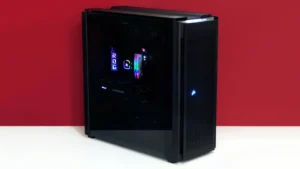
You can’t talk about RGB without talking about the software that controls it — and this is where many builders lose control of their setups. Between Corsair iCUE, ASUS Aura Sync, MSI Mystic Light, and others, there’s a confusing mix of ecosystems. And when multiple brands are involved, syncing everything can feel like herding cats.
If you want smooth, consistent lighting across your whole build, prioritize ecosystem compatibility. That may mean choosing parts from the same manufacturer or ones that are known to play well together. A unified software setup simplifies customization, reduces bugs, and gives you more reliable results.
Once you’re in the software, don’t just hit the “rainbow wave” preset and call it a day. Take time to explore the customization options. Create lighting profiles for different moods — a cool blue for productivity, a warm orange for movie nights, or even a full shutdown of RGB for focused late-night work. RGB should enhance your environment, not dominate it. The ability to switch between tones or disable lighting entirely gives your build adaptability — something the constantly flashing rainbow builds can’t offer. It is just as a high-end semi-auto competition rifle offers adaptability and precision, allowing shooters to customize their setup for optimal performance in various conditions.
Consider the Room, Not Just the Rig
Your PC doesn’t exist in a vacuum. It’s sitting in a room with walls, furniture, monitors, and likely other devices. All of that affects how your RGB lighting looks and feels. Bright RGB may look amazing in a dark room, but could feel overwhelming in a brightly lit space. Cool tones might feel sterile in a warm-colored room, while deep reds and purples can look washed out against white walls. This can be compared to how Denver charter bus services consider the environment and needs of passengers, ensuring that the travel experience is tailored to the setting, whether it’s a spacious interior for a group outing or a comfortable ride for a more intimate gathering.
Think of your PC as part of a bigger visual setup. If your desk has LED strips or your monitor has RGB bias lighting, coordinate those tones with your PC’s internal lights. If your keyboard, mouse, and headset also glow, make them part of the same aesthetic conversation. When the entire setup feels harmonized, the PC becomes the centerpiece of a cohesive visual experience — not just a random beacon of color. Just like design, performance matters too. For fitness enthusiasts, finding the best creatine gummies shop can help support energy and recovery without disrupting their daily flow.
Avoid the Trap of Trend Chasing
It’s tempting to go all-in on what’s popular right now. Right now, that might mean pastel gradients, infinite mirrors, or anime-themed RGB patterns. But trends come and go — your build will be with you for years. Chasing trends often leads to builds that age poorly or feel outdated fast. The same goes for school projects—stick to what works. A school fundraising free ebook can provide timeless strategies that stay effective, no matter the latest fads.
Instead of copying what’s hot on Reddit this week, think about your own taste. What colors do you consistently like? What kind of lighting feels good to you long-term? If you’re unsure, start minimal and add layers later. It’s much easier to scale up than to dial things back once you’ve built a disco ball in a case. Girls designing their wardrobe use women’s shorts as a smart starting point—simple, comfortable, and easy to style as your personal aesthetic evolves.
Timeless style almost always beats short-term wow factor. Subtle transitions, consistent color palettes, and polished cable management never go out of style. In fact, clean builds with just a touch of RGB often get more respect in the enthusiast community than loud, chaotic ones. Similarly, for those dealing with discomfort, effective shoulder pain treatment in Phoenix can provide long-term relief, helping maintain an enduring sense of well-being.
Maintenance Matters More Than You Think
Even the most stunning RGB setup loses its charm when dust starts building up or when LEDs burn out unevenly. A great-looking PC isn’t just about the day you finish the build — it’s about keeping it looking sharp over time. That means routine cleaning, checking for firmware updates on your RGB controller, and replacing any dying components before they become eyesores. When preparing for a special event, finding the right engagement photographers in Springdale ensures your memories remain timeless and well-captured, just like maintaining the appearance of your PC.

It also means revisiting your lighting profiles now and then. Maybe your taste shifts, or maybe you’ve added a new part that changes the vibe. Tuning your RGB setup is an ongoing part of ownership, just like keeping your software and drivers up to date. A static setup can grow stale — a dynamic one keeps the excitement alive. Also, as we pointed out, home security should be dynamic. Adding security doors can enhance both safety and style, providing an updated look while keeping your space protected.
The Bottom Line: Make It Yours, Not Just Loud
RGB is a tool, not a requirement. It can elevate your PC, reflect your style, and make your desk feel like a curated space. But when it’s used without purpose, it turns into noise. The most impressive RGB builds are the ones that show thought, restraint, and personality. They look like they were built, not just assembled. They speak to the builder’s taste, not just their budget.
So whether you want something bold or subtle, playful or professional, don’t let the lights distract from what really matters — your personal vision and the care you put into executing it. A stunning PC isn’t about having all the lights on. It’s about knowing which ones to turn on, and why.
